In Consulting/Legal Firm.
I use color coding to distinguish between:
Manual – human entry, etc
AI LLM – using only AI (new approach)
vs
Rule-based script (classical programming)
vs
Mixed both above. (some kind of mix)
Summary
| Aspect | Details |
|---|---|
| Client Profile | 5-person consulting firm, 20-30 new clients/month, handling sensitive contracts & NDAs |
| The Pain (As-Is) | • 12-15 hours/week manually: collecting client info via email, drafting engagement letters, setting up project folders in Drive/Dropbox, entering data into CRM • Errors: missing signatures, inconsistent folder structures, delayed kickoff • Risk: client data scattered across email, personal drives, unsecured tools |
| The Solution (To-Be) | AI-Powered Onboarding Pipeline: 1. Client fills secure Typeform/SoFort intake form 2. Make.com/Zapier triggers: – Local LLM (Ollama + Llama 3) drafts engagement letter using client inputs + firm templates – Auto-create encrypted folder structure in Nextcloud/Synology (self-hosted) – Push client summary to CRM (HubSpot/Pipedrive) with tags 3. Human review step: partner approves letter + folder setup before sending 4. Auto-send welcome email with secure portal link |
| Tool Stack | • Intake: Typeform (GDPR-compliant) or self-hosted Formbricks • Orchestration: Make.com (more visual than Zapier for complex logic) • AI Drafting: Ollama + Llama 3 8B (local, no data leaves machine) • Storage: Nextcloud (self-hosted, end-to-end encryption) • CRM: HubSpot (free tier) or Pipedrive |
| Privacy Strategy | • All client PII stays in EU-hosted or self-hosted tools • Local LLM for document drafting = zero data sent to OpenAI/Anthropic • Access logs + 2FA enforced on all systems |
| Effort to Implement | Medium (3-5 days of setup + testing) |
| ROI Calculation | (Hours Saved/Week × Hourly Rate) × 52 - Tool Costs• 12 hrs/week × $150/hr (partner rate) × 52 = $93,600/year • Tool costs: ~$50/month = $600/year • Net ROI Year 1: ~$93,000 • Plus: faster client kickoff, fewer errors, stronger compliance posture |
| Risk Mitigation | • Start with 1-2 pilot clients before full rollout • Keep human approval step for all legal documents • Document the workflow for team training |
Why this excites clients: It turns a chaotic, error-prone administrative burden into a streamlined, compliant, scalable system — freeing partners to do billable work.
Schema
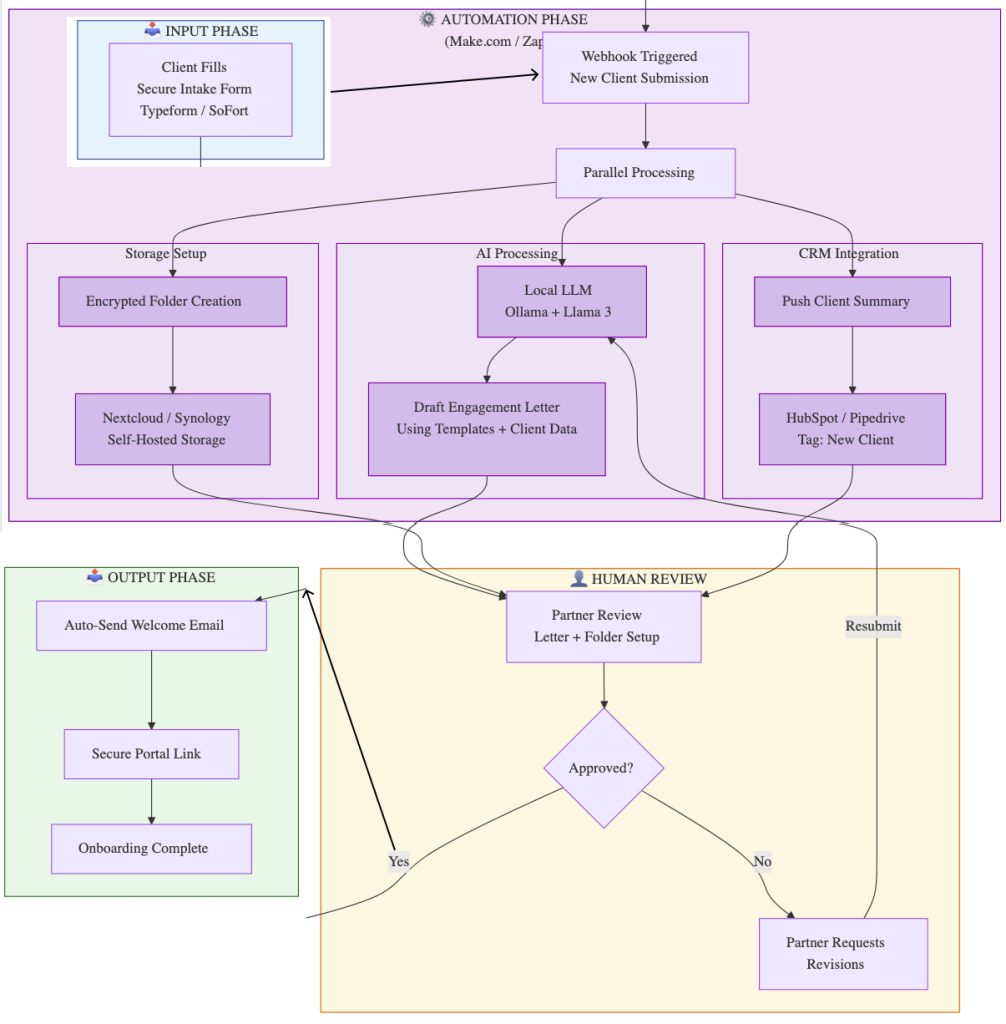
Detailed Breakdown: Summit Advisors (fictional Consulting/Legal Firm)
Task #1. Collecting Client Info via Email — What Kind of Data?
In the « as-is » state, this is unstructured, chaotic, and risky. A partner might send an email like:
Subject: New Client – Acme Corp
Body:
« Hi Sarah, please onboard Acme Corp. Contact is Jane Doe, jane.doe@acmecorp.com. It’s for a market entry strategy project in Germany. Budget is $25k. We need an NDA and engagement letter. They’re concerned about data residency. Let’s get the folder set up. »
This single email contains:
- Firmographic Data: Client company name, project type (« market entry »), geography (« Germany »).
- Contact Data: Name, title, email, and implied role (primary contact).
- Commercial Data: Budget ($25k).
- Legal/Compliance Triggers: « NDA needed, » « data residency » concern.
- Actionable Instructions: « Set up folder. »
The pain is that Sarah has to manually parse this email, copy-paste data into the CRM, remember to create the NDA, and build the folder structure from scratch. If she misses a detail, it causes a delay.
Task#2. Drafting Engagement Letters — Example
The AI wouldn’t write a complex, 20-page contract from scratch. It would use a template. Here’s a simplified version of the template stored in the firm’s secure drive, and the AI-drafted output for the Acme Corp example.
Template (Snippet):
[DATE]
[CLIENT COMPANY NAME]
[CLIENT CONTACT NAME]
[CLIENT CONTACT EMAIL]Re: Engagement Letter for [PROJECT NAME]
Dear [CLIENT CONTACT NAME],
This letter (the « Agreement ») confirms our engagement to provide consulting services to CLIENT COMPANY NAME as described below.
1. Scope of Services
Summit Advisors will provide consulting services related to [PROJECT SCOPE] . The specific objectives and deliverables will be outlined in a separate Statement of Work, which will become part of this Agreement upon execution by both parties.2. Fees and Payment Terms
The Client agrees to pay Summit Advisors a fixed fee of [$FEE] for the services outlined in the initial SOW. This fee is due upon execution of this Agreement. Any additional work outside the scope will be billed at a rate of [$HOURLY_RATE] per hour.3. Confidentiality
In accordance with the separate Non-Disclosure Agreement executed by the parties, both parties agree to protect the confidentiality of all shared information.… (Standard legal clauses: Term, Termination, Liability, Governing Law) …
Accepted and Agreed:
[CLIENT CONTACT NAME]
Title: [CLIENT CONTACT TITLE]
[PARTNER NAME]
Partner, Summit Advisors
AI-Drafted Output (Using the data from the email in Question 1):
Date: October 26, 2023
Acme Corporation
Jane Doe
jane.doe@acmecorp.comRe: Engagement Letter for Germany Market Entry Strategy
Dear Jane Doe,
This letter (the « Agreement ») confirms our engagement to provide consulting services to Acme Corporation (the « Client ») as described below.
1. Scope of Services
Summit Advisors will provide consulting services related to developing a market entry strategy for Germany. The specific objectives and deliverables will be outlined in a separate Statement of Work, which will become part of this Agreement upon execution by both parties.2. Fees and Payment Terms
The Client agrees to pay Summit Advisors a fixed fee of $25,000 for the services outlined in the initial SOW. This fee is due upon execution of this Agreement. Any additional work outside the scope will be billed at a rate of $350 per hour.… (Remaining standard legal clauses remain unchanged from template) …
The partner simply reviews, makes any tweaks, and clicks « approve. »
Task#3. Setting up Project Folders — What Goes In There?
This is about creating a consistent, navigable structure from day one, eliminating the « where did Sarah save that file? » problem. The automation creates a folder with a standard naming convention (e.g., YYYYMMDD_Client_Project) and subfolders.
The structure for Acme Corp might look like this:
/20241026_Acme_GermanyMarketEntry/
├── 01_Contracts_NDAs/
│   ├── NDA_-_Acme_-_Executed.pdf
│   └── Engagement_Letter_-_Acme_-_Draft_v1.docx
├── 02_Client_Intake/
│   ├── Completed_Intake_Form_-_Acme.pdf
│   └── Client_Background_-_Jane_Doe.eml
├── 03_Project_Deliverables/
│   └── (To be populated with reports, presentations, etc.)
├── 04_Research_Data/
│   └── (To be populated with market analysis, competitor data)
├── 05_Financials/
│   ├── Invoice_001_-_Acme_$25k.pdf (generated later)
│   └── (Timesheets, expense reports)
└── 06_Correspondence/
    └── (Auto-logged emails related to the project)
4. Entering Data into CRM — What Kind?
The goal is to move from a « to-do list » in an email to a searchable, reportable database. The automation pushes a structured data set into the CRM (HubSpot, Pipedrive, etc.).
For the Acme Corp deal, it would create a new « Deal » record with:
- Deal Name: Acme Corp – Germany Market Entry
- Client Company: Acme Corporation
- Contact: Jane Doe (Title: [from email or inferred], Email, Phone)
- Deal Stage: « Contract Sent » (automatically set after the AI drafts the letter)
- Amount: $25,000
- Close Date: (Based on project start date)
- Deal Type: New Business
- Service Line: Strategy Consulting
- Partner Owner: [Name from approval step]
- Tags:
#GDPR#Germany#MarketEntry - Notes: (A log of the automation) « Intake completed Oct 26. Engagement letter drafted and sent for partner approval. »
This turns the deal into a trackable asset. The firm can now run reports on how many « Contract Sent » deals are pending, what the average deal size is for « Strategy Consulting, » or which partner has the most active deals in Germany. This is impossible with the scattered email approach.