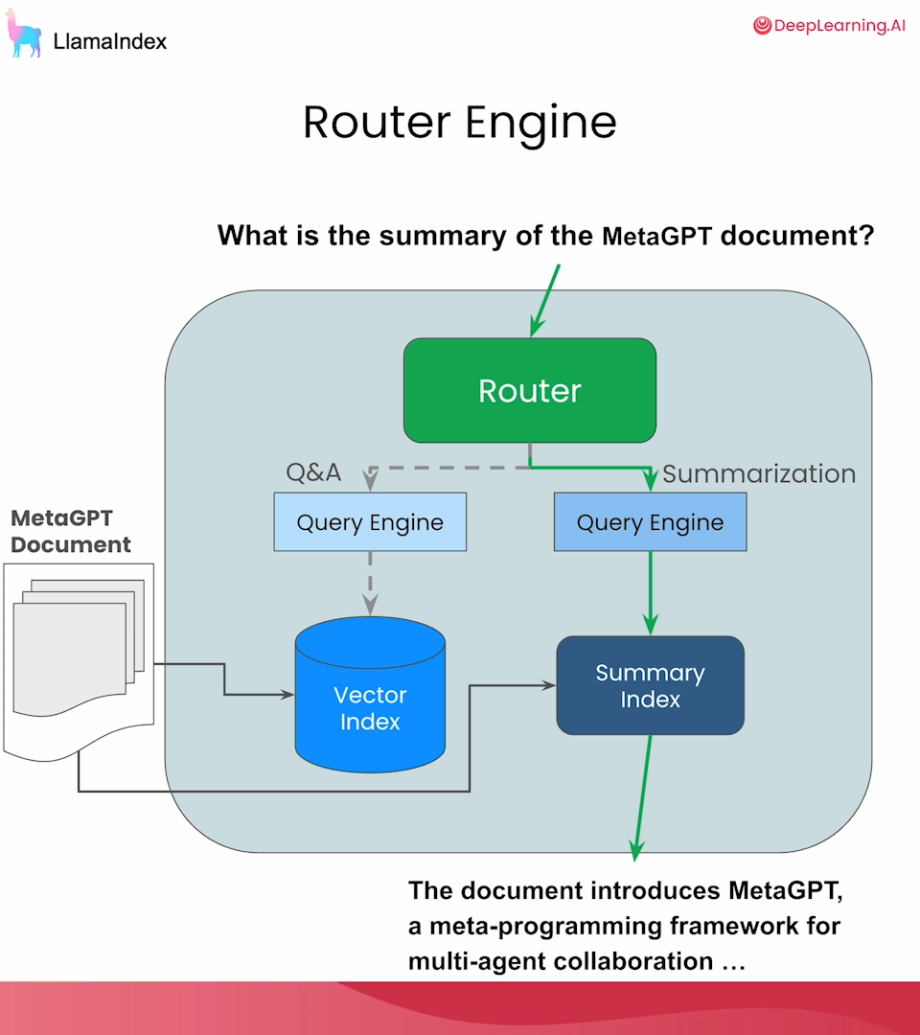
Here is a compact, visually structured summary of Lesson 1: Building a Single-Document Router.
Lesson 1: Building a Single-Docu
🎯 Lesson Objective
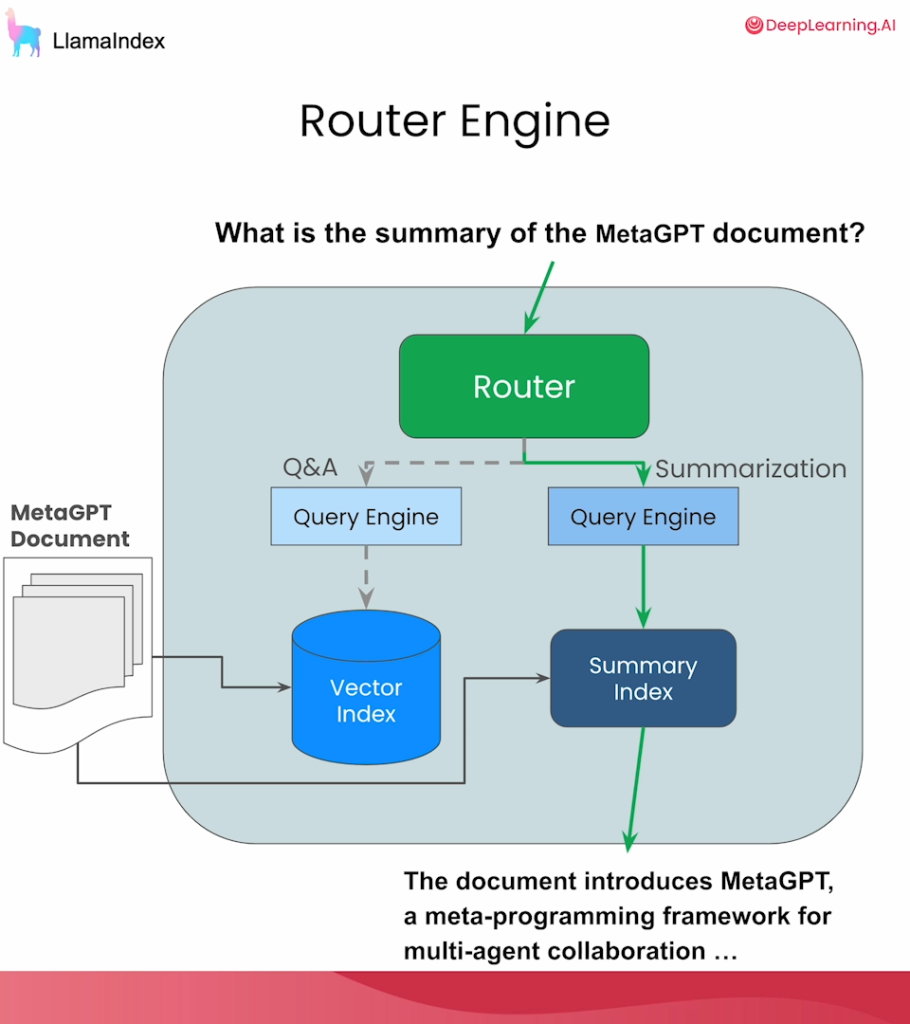
Build the simplest form of Agentic RAG: a Router over a single document. The router dynamically analyzes a user’s query and decides whether to use a Question Answering (QA) engine or a Summarization engine.
🏗️ Step 1: Setup & Data Ingestion
- Environment: Import OpenAI keys and
nest_asyncio(required to make async operations work smoothly inside Jupyter Notebooks). - Load Document: Use
SimpleDirectoryReaderto load a PDF (e.g., the MetaGPT paper). - Chunking: Use
SentenceSplitterto break the document into manageable chunks (e.g., chunk size of 1024). - Global Settings: Define your default LLM (e.g., GPT-3.5/4) and Embedding model in the global config.
🗄️ Step 2: Create Indexes & Query Engines
You need two distinct indexes, each with different retrieval behaviors:
| Index Type | Retrieval Behavior | Best Used For |
|---|---|---|
| Vector Index | Returns the most similar nodes based on semantic embeddings. | Specific Q&A (finding exact details). |
| Summary Index | Returns ALL nodes in the index regardless of the query. | Summarization (getting the big picture). |
Action: Convert both indexes into Query Engines (Tip: set use_async=True on the summary engine for faster generation).
🛠️ Step 3: Wrap Engines as « Tools »
A Query Tool is simply a Query Engine + Metadata. The metadata (specifically the description) tells the router when to use the tool.
- Tool 1 (Summary): « Useful for summarization questions related to MetaGPT. »
- Tool 2 (Vector): « Useful for retrieving specific context from the MetaGPT paper. »
🧠 Step 4: Build the Router
The router uses a Selector to decide which tool to invoke. LlamaIndex offers two main types:
- LLM Selector: Prompts the LLM to output raw JSON, which is then parsed.
- Pydantic Selector: Uses native Function Calling APIs (like OpenAI’s) to output structured Pydantic objects (more reliable).
Action: Instantiate a RouterQueryEngine using an LLMSingleSelector and pass in your two Query Tools.
🧪 Step 5: Testing the Router
When you pass a query to the router, it reads the tool descriptions and routes accordingly:
- Query 1:« What is a summary of the document? »
- Router Action: Selects Summary Tool.
- Result: Synthesizes all 34 chunks of the document into a high-level overview.
- Query 2:« How do agents share information with other agents? »
- Router Action: Selects Vector Tool.
- Reasoning: The LLM recognizes this requires specific context from a specific paragraph, not a general summary.
- Query 3:« Tell me about the ablation study results. »
- Router Action: Selects Vector Tool (again, looking for specific data points).
💡 Key Takeaway
To make this reusable, wrap the entire pipeline (loading, chunking, indexing, and routing) into a single helper function, like get_router_query_engine(file_path). This allows you to easily spin up a router for any PDF you drop into the system!
Lesson 2: Tool Calling & Metadata Filtering.
Here is a compact, visually structured summary of Lesson 2: Tool Calling & Metadata Filtering.
🎯 Lesson Objective
Move beyond simple routing. Teach the LLM to perform Tool Calling—meaning it doesn’t just pick which tool to use, but dynamically infers the exact arguments (parameters) to pass into that tool.
🛠️ Core Concept: The FunctionTool Abstraction
In LlamaIndex, any Python function can become a tool using the FunctionTool class.
The Golden Rule for Tool Definitions:
Your Python functions must have clear type annotations and docstrings. The LLM reads these to understand what the tool does and what arguments it expects.
# Example: The LLM reads the docstring and types to know how to use it
def add(x: int, y: int) -> int:
    """Adds two integers together."""
    return x + y

# Wrap it as a tool
add_tool = FunctionTool.from_defaults(fn=add)
🧠 Step 1: Basic Tool Calling
To let the LLM use the tool, you use the predict_and_call method.
- Input: A user prompt (e.g., « What is 2 plus 9? ») and a list of tools.
- LLM Action: The LLM selects the
addtool, infers the arguments (x=2,y=9), executes it, and returns the final synthesized answer (11).
🎛️ Step 2: Agentic Metadata Filtering (The Main Event)
Instead of just doing math, we apply tool calling to Vector Search to make retrieval hyper-precise using Metadata Filters.
1. Understanding Metadata
When you chunk a PDF (like the MetaGPT paper), LlamaIndex automatically attaches metadata to every chunk (Node), such as page_label, file_name, and file_size.
2. Manual Filtering (The Old Way)
You can manually restrict a vector search to specific pages using MetadataFilters:
# Manually force the search to ONLY look at page 2
filters = MetadataFilters(filters=[ExactMatchFilter(key="page_label", value="2")])
query_engine = vector_index.as_query_engine(filters=filters, similarity_top_k=2)
3. Agentic Filtering (The LlamaIndex Way)
Instead of hardcoding the page number, we write a Python function that accepts the page number as an argument, and turn it into a tool!
def vector_query(query_str: str, page_numbers: list[int]) -> str:
    """Perform a vector search over an index with page number filters."""
    # 1. Create filters based on the LLM's inferred page numbers
    filters = MetadataFilters(...)
    # 2. Query the index
    query_engine = vector_index.as_query_engine(filters=filters)
    return query_engine.query(query_str)

# Wrap it as a tool!
vector_tool = FunctionTool.from_defaults(fn=vector_query)
🚀 Step 3: Testing the Agentic Router
Now, we give the LLM both the Summary Tool (from Lesson 1) and our new Vector Tool (with metadata filtering).
When the user asks: « What are the high level results of MetaGPT as described on page two? »
- Tool Selection: The LLM chooses the
vector_tool(because it’s asking for specific results, not a whole-document summary). - Argument Inference: The LLM reads the prompt and infers the arguments:
query_str= « high level results of MetaGPT »page_numbers=[2]
- Execution: The tool filters the vector database to only page 2, retrieves the context, and generates the answer.
💡 Key Takeaways
- Standard RAG: LLM just reads retrieved text and summarizes it.
- Lesson 1 (Routing): LLM picks the right pipeline (Summary vs. Vector).
- Lesson 2 (Tool Calling): LLM picks the right tool AND figures out the exact parameters (like specific page numbers or dates) to make the search perfectly precise.
⚙️ Groq / Local Model Pro-Tip for Lesson 2
Since you are using Groq (Llama 3.1) instead of OpenAI:
- Llama 3.1 has native tool calling capabilities.
- When you use
predict_and_callin LlamaIndex with Groq, it will automatically format the request using Llama 3’s special tool-calling tokens. - Tip: Make sure your Python function docstrings are very explicit. Open-source models rely heavily on the docstring to figure out what arguments to extract, whereas OpenAI models sometimes get away with vague descriptions!
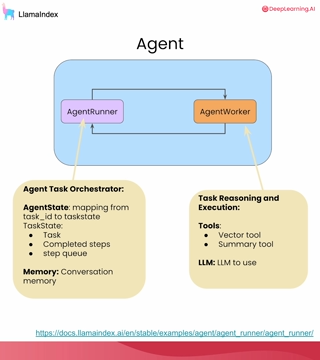
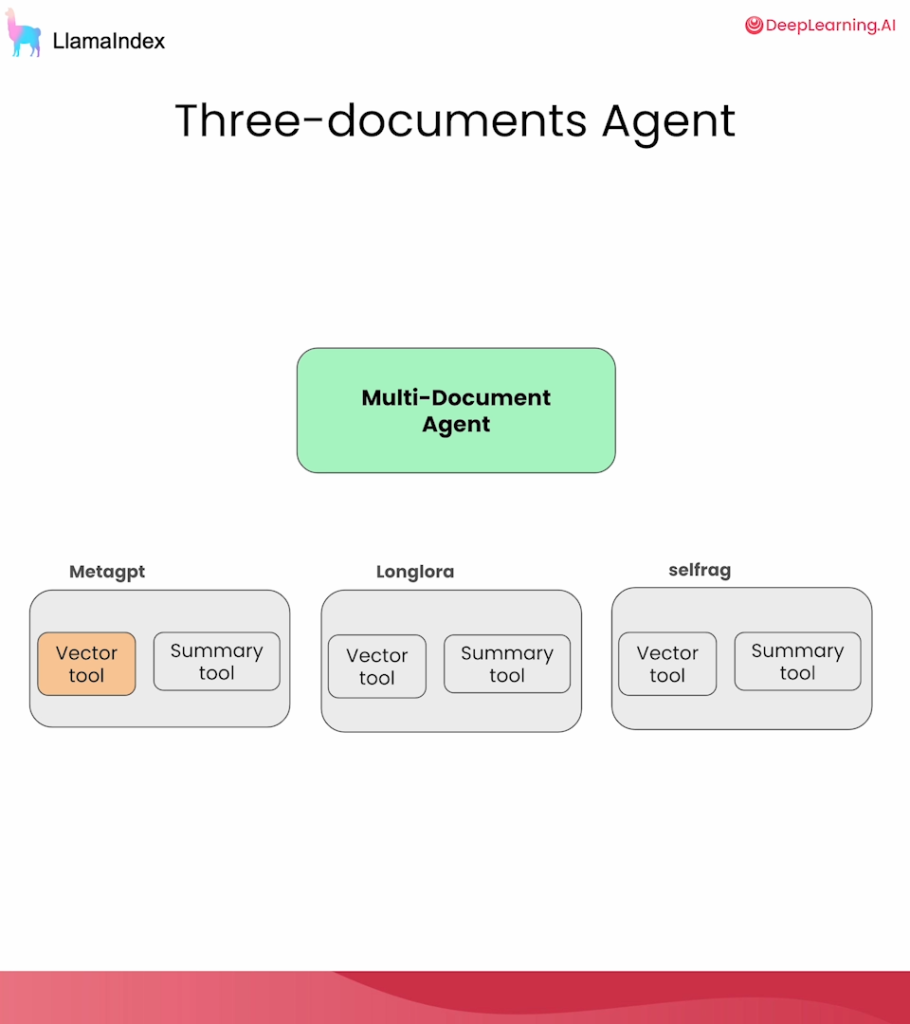
Here is a compact, visually structured summary of Lesson 3: Multi-Document Agents & Tool Retrieval.
🎯 Lesson Objective
Scale your Agentic RAG system from a single document to multiple documents. Learn how to overcome the « too many tools » problem by using Tool Retrieval (applying RAG to your tools, not just your text).
📚 Phase 1: The Multi-Document Setup (Small Scale)
To handle multiple documents, you simply generate tools for each document and pass them all to the agent.
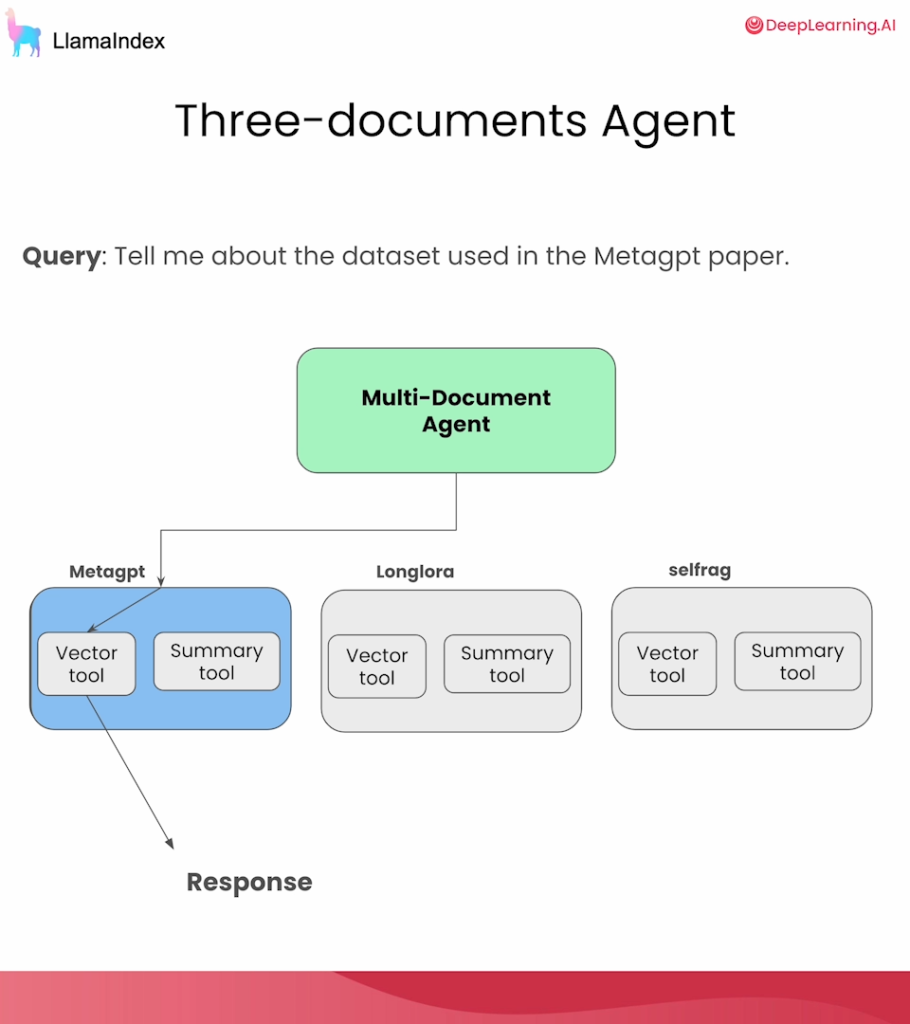
- The Setup: Load 3 papers (e.g., MetaGPT, LongLora, SelfRAG).
- The Tools: Use a helper function (like
get_doc_tools) to create a Vector Tool and a Summary Tool for each paper. - The Math: 3 papers × 2 tools = 6 total tools.
- The Result: The agent can now answer cross-document questions (e.g., « Summarize both SelfRAG and LongLora ») by calling multiple tools sequentially and synthesizing the results.
📉 Phase 2: The Scaling Problem
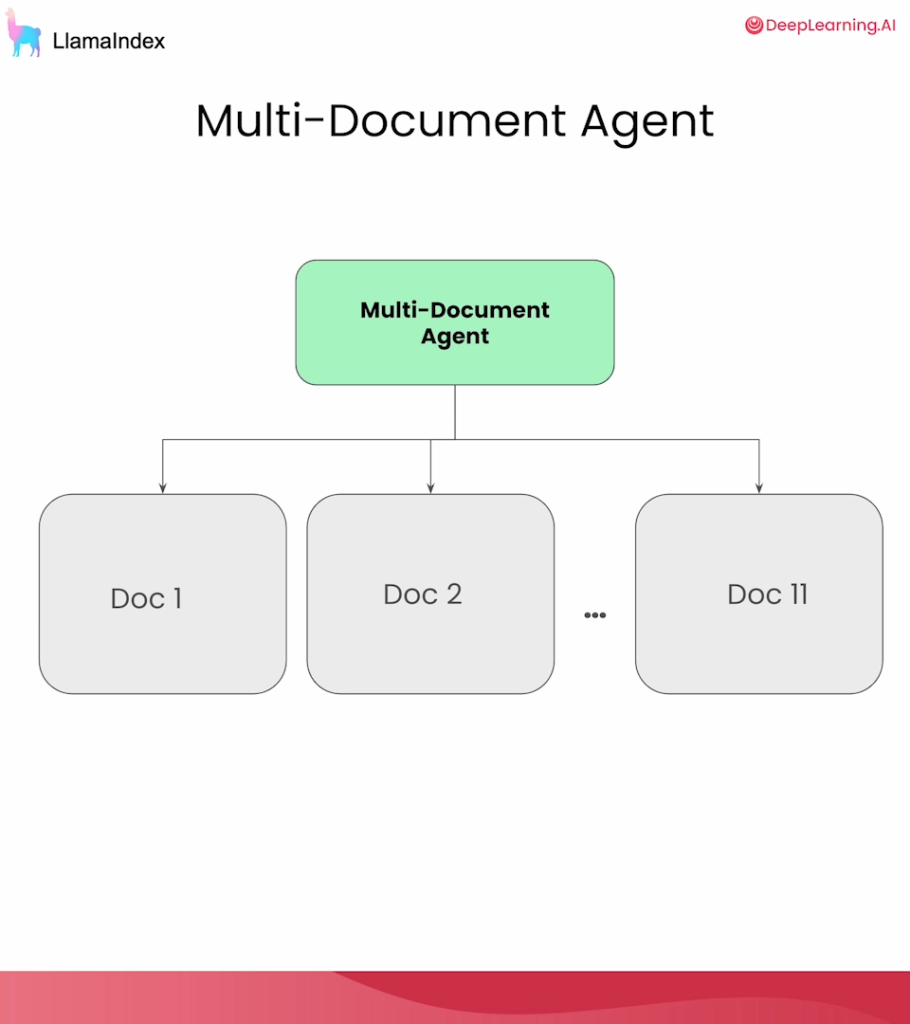
What happens when you scale from 3 papers to 11, 100, or 1,000 papers?
(100 papers = 200 tools!)
Passing hundreds of tools directly into the LLM prompt causes three major issues:
- Context Limits: The tools won’t even fit in the context window.
- Cost & Latency: Massive token counts make the API slow and expensive.
- LLM Confusion: The model gets overwhelmed and fails to pick the correct tool.
💡 Phase 3: The Solution — « RAG for Tools »
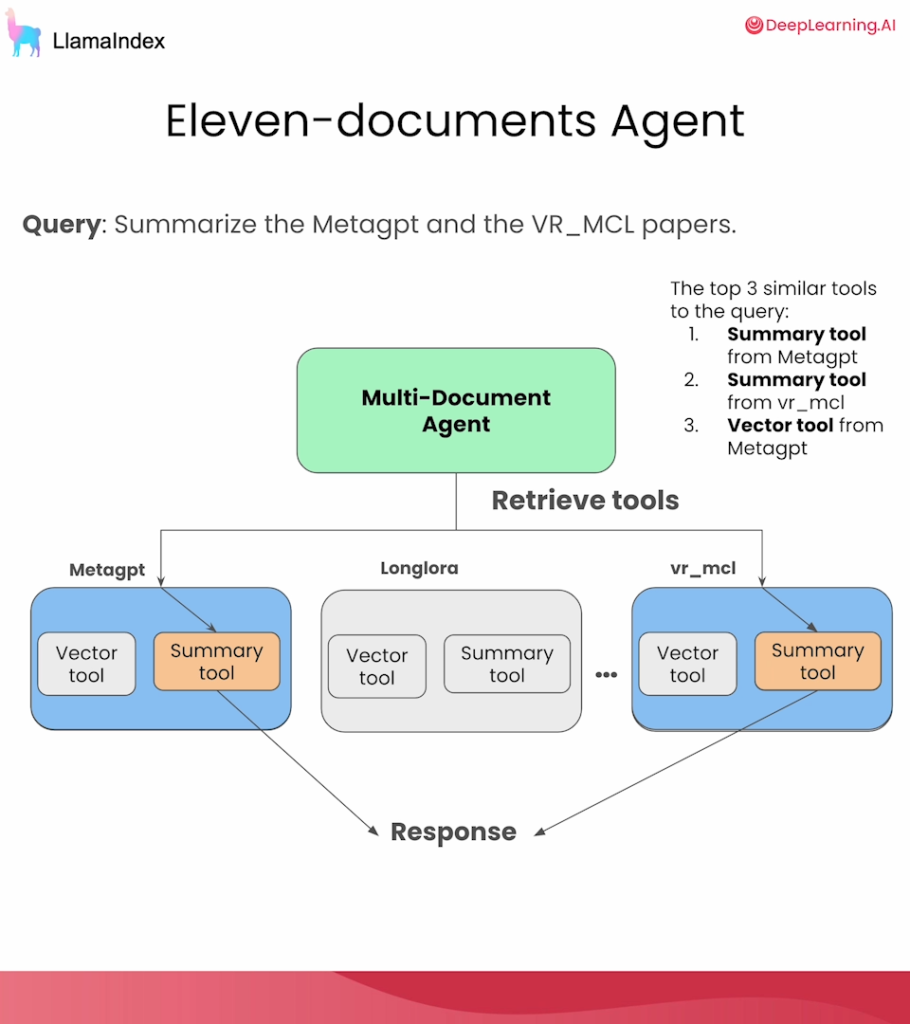
Instead of giving the LLM all the tools, we use Retrieval-Augmented Generation on the tools themselves.
- User asks a question.
- Retrieve: We do a quick vector search to find the top 3-5 most relevant tools for that specific question.
- Execute: We pass only those few relevant tools to the Agent’s reasoning prompt.
🛠️ Phase 4: Implementation in LlamaIndex
To retrieve tools, LlamaIndex uses the ObjectIndex and ObjectRetriever abstractions.
- Standard Vector Index: Stores text chunks and returns text chunks.
- Object Index: Stores Python objects (your tools), embeds their text descriptions, but returns the actual executable Python functions when queried!
from llama_index.core import ObjectIndex, VectorStoreIndex
from llama_index.core.objects import ObjectRetriever

# 1. Wrap your list of tools in an ObjectIndex
obj_index = ObjectIndex.from_objects(
    all_tools, # Your list of 200+ tools
    index_cls=VectorStoreIndex
)

# 2. Create a retriever that returns the actual tool objects
tool_retriever = obj_index.as_retriever(similarity_top_k=5)
🚀 Phase 5: Building the Advanced Agent
Now, instead of passing a static list of tools to the agent, you pass the tool_retriever.
from llama_index.agent.openai import OpenAIAgent # or FunctionCallingAgent

agent = OpenAIAgent.from_tools(
    tool_retriever=tool_retriever, # Dynamic tool retrieval!
    system_prompt="You are a helpful research assistant...", # Optional guidance
    verbose=True
)
Testing the Agent:
- Query: « Compare the eval datasets in MetaGPT and Swebench. »
- Agent Action:
- The retriever fetches the MetaGPT and Swebench tools.
- The agent calls both summary/vector tools.
- The agent compares the outputs and generates the final answer.
🏆 Key Takeaways
- Small Scale (< 10 docs): You can pass all tools directly to the agent.
- Large Scale (10+ docs): You must use an
ObjectRetrieverto dynamically fetch only the relevant tools for each query. - System Prompts: Adding a
system_promptto your agent is a great way to enforce formatting, tone, or specific reasoning steps without cluttering the tool descriptions.
⚙️ Groq / Local Model Pro-Tip for Lesson 3
If you are using Groq (Llama 3.1) or a local model for this lesson:
- Tool Retrieval is mandatory for you! Open-source models have much smaller context windows and get confused much faster than GPT-4 when looking at long lists of tools.
- By using the
ObjectRetrieverto limit the tools to just 3 or 4 at a time, you will drastically improve the accuracy and reliability of Llama 3.1’s tool-calling!
